The modern driving experience is defined by how seamlessly your vehicle keeps you connected to your digital life while on the move. The latest-generation Toyota Audio Multimedia system represents a complete ground-up redesign of the brand's in-cabin technology. This modern interface made its debut in the all-new 2026 Toyota RAV4 and is rapidly rolling out to future models across the lineup. By focusing on faster processing, crisp high-resolution graphics, and intuitive menu structures, this platform ensures that Columbia drivers can access navigation, media, and vehicle settings without distraction.
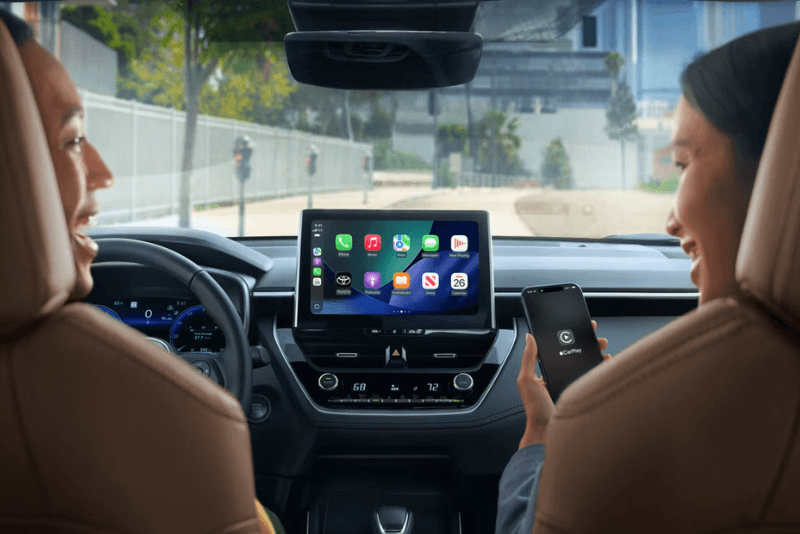
One of the most significant upgrades in this system is the integration of wireless smartphone connectivity. Every new model equipped with the latest platform features standard wireless Apple CarPlay and wireless Android Auto compatibility. This means you can leave your phone in your pocket or on the available wireless charging pad while your favorite maps, messages, and playlists automatically sync to the dashboard screen. Furthermore, this system is the very first from the manufacturer to integrate 5G network connectivity powered by AT&T, delivering lightning-fast data speeds for cloud-based applications and system updates.
If you are shopping for a tech-forward vehicle, we invite you to browse our new-vehicle inventory online to see which models feature these large, vivid displays. From the highly efficient 2026 Toyota Camry with its standard hybrid powertrain to the spacious three-row 2026 Toyota Grand Highlander, there is a tech-equipped model designed for every lifestyle. To experience these features in person, you can get turn-by-turn directions to Roberts Toyota and let our sales team walk you through a demonstration on our showroom floor. If you have immediate questions about model availability or specific tech packages, feel free to give our team a quick call today.
How Do I Set Up a Toyota User Profile?
The days of manually adjusting your radio presets and system preferences every time someone else drives your vehicle are over. The new multimedia platform utilizes cloud-saved Toyota User Profiles to store your personalized settings. This profile saves everything from your preferred radio stations and climate control preferences to your favorite navigation destinations and screen display themes. Because these profiles are stored securely in the cloud, they are tied directly to you rather than a single vehicle, allowing your settings to follow you if you drive another compatible vehicle.
Setting up your profile is a straightforward digital process that begins on your smartphone. First, download the official manufacturer app and create an account using your credentials. Once your account is active, turn on your vehicle's ignition to display the system welcome screen. The touchscreen will generate a unique QR code. Simply scan this code using your smartphone camera within the app, and the system will instantly link your phone to the vehicle. This synchronization automatically pairs your device via Bluetooth and loads your saved profile.
This personalized technology is not limited strictly to our newest showroom models. If you are shopping for a high-quality pre-owned vehicle, you can browse our used-vehicle inventory to find late-model options equipped with early versions of these personalized profile features. The system supports multiple saved profiles, allowing different family members to link their individual profiles to separate physical key fobs or smartphones. When you open the driver's door, the cabin automatically recognizes your device or key and adjusts the multimedia settings to your exact specifications before you even press the start button.
How Do I Use the "Hey Toyota" Voice Command System?
Hands-free control reaches a new level of capability with the advanced Intelligent Assistant built into the multimedia system. Activated by a simple steering wheel button or by saying the wake phrase "Hey Toyota", this voice recognition system uses natural language processing to understand casual commands. Unlike older systems that required rigid, pre-programmed phrases, this platform is designed to interpret conversational speech, allowing you to keep your eyes on the road and your hands on the wheel.
With an active Drive Connect subscription, the voice assistant taps into cloud-based computing to perform a wide variety of tasks. You can adjust the cabin temperature by saying "I'm cold," search for local landmarks using integrated Google Points of Interest, or send a text message to a contact. For example, if you are planning a weekend trip to fish or hike along the Duck River, you can simply say, "Find a park near the Duck River," and the cloud-navigation system will instantly map out alternate routes based on real-time traffic data.
To make upgrading to a tech-equipped vehicle even easier, our team can help you value your trade-in online so you know exactly what your current car is worth before visiting our showroom. During a test drive, our sales specialists will gladly show you how the voice command system can control cabin features without navigating complex menus. The system is even smart enough to detect whether the driver or the front passenger is speaking, adjusting the dual-zone climate control specifically for the side of the vehicle where the request originated.
Comparing Toyota Audio Multimedia to Competitors
When cross-shopping modern vehicles, comparing the capability of the in-cabin technology is just as important as comparing horsepower or cargo volume. The Toyota Audio Multimedia system holds a distinct advantage when compared directly to rival platforms like Ford SYNC 4 and Hyundai Bluelink. While all three systems offer wireless smartphone integration and over-the-air software updates, the manufacturer's system focuses on a cleaner, less cluttered user interface that minimizes distraction for drivers navigating busy suburban corridors.
A major differentiator is the inclusion of a standard built-in Drive Recorder Dash Cam on models like the 2026 RAV4, which utilizes the vehicle's existing exterior cameras to capture manual and collision-triggered events. Additionally, the available full-screen turn-by-turn navigation shown directly on the digital gauge cluster is a class-exclusive configuration that keeps vital route guidance directly in your line of sight. While Ford SYNC 4 emphasizes complex split-screen multitasking layouts that can feel overwhelming, this system prioritizes large, easy-to-tap touch targets and rapid voice responses.
To help you secure the latest technology with payment terms that fit your budget, you can take the first step toward ownership by applying for financing online through our secure credit application. Our finance department works with a variety of competitive lenders to structure personalized purchase plans. Whether you are looking at the exceptional efficiency of the hybrid 2026 Toyota Camry or the rugged versatility of our SUV lineup, our team will help you compare tech packages to ensure you get the exact features you want.
How to Troubleshoot a Frozen Toyota Multimedia Screen
Even the most advanced automotive computer systems can occasionally experience a temporary software lockup or communication lag. If your touchscreen becomes unresponsive, freezes on a specific menu, or fails to connect to your smartphone's Bluetooth, there is a simple manual reset process you can perform right from the driver's seat. You do not need any tools or a service appointment to quickly reboot the system and restore full functionality.
To perform a system reset, make sure the vehicle is parked safely. Press and hold down the physical volume and power knob located on the lower corner of the multimedia bezel. Continue holding the knob down for approximately 10 to 15 seconds. The screen will eventually go completely black, indicating that the system is shutting down. Release the knob once the screen turns off. Within a few seconds, the official brand logo will reappear on the display, signaling that the multimedia system has successfully rebooted and re-established its network connections.
If a manual reboot does not resolve the issue, the root cause may be a pending software update. The system is designed to receive Over-the-Air (OTA) software updates automatically via the built-in AT&T network connection. To check for updates manually, navigate to the system settings menu on your touchscreen, select "Software Update," and follow the prompts to install any available patches. Keeping your system updated ensures optimal compatibility with the latest iOS and Android smartphone operating systems.
Quick Answers Before You Visit
Q: Does the multimedia system require a paid subscription to use navigation?
A: While basic wireless smartphone integration through Apple CarPlay and Android Auto is completely free and requires no subscription, the native cloud-based navigation, live-agent Destination Assist, and advanced voice assistant functions require an active Drive Connect subscription after the initial trial period expires.
Q: How many smartphones can be connected to the system at the same time?
A: The multimedia system features dual Bluetooth connectivity, allowing up to two compatible smartphones to be paired and active simultaneously for hands-free phone calls and audio streaming.
Q: What is Integrated Streaming and how does it work?
A: This feature allows you to link your existing Apple Music or Amazon Music subscription directly to your vehicle's audio source menu. It utilizes the vehicle's built-in Wi-Fi connection to stream your personal playlists without draining your smartphone's battery or cellular data plan.
Q: What screen sizes are available on new models?
A: Screen sizes vary by model and trim level. For example, the 2026 Corolla features a standard 8-inch touchscreen, while a larger 10.5-inch high-resolution display is available on SE models and comes standard on the top-tier XSE trim.
Q: What is the purpose of the JBL Premium Audio system's Clari-Fi technology?
A: The available premium JBL sound system includes Clari-Fi technology, which automatically analyzes and rebuilds the audio signals of digitally compressed music files, restoring lost depth, warmth, and high-frequency clarity to streamed audio.
Pricing
MSRP by trim
| Feature | LE | Nightshade | SE | XLE | XSE |
|---|---|---|---|---|---|
| Base MSRP | $29,300 | $32,800 | $31,800 | $34,500 | $35,700 |
| Destination charge | $1,195 | $1,195 | $1,295 | $1,195 | $1,195 |
Find Your Tech-Equipped Toyota
Choosing a vehicle with the right technology package is all about finding the perfect balance between daily utility and modern convenience. The entire lineup at Roberts Toyota is designed to deliver reliable performance alongside these advanced connectivity features. Whether you are looking for a fuel-efficient commuter car or a spacious family SUV, our sales specialists are ready to assist you in comparing trim levels and finding the ideal match for your driving habits.
To help you visualize how these vehicles fit your lifestyle, consider the impressive specifications of our popular hybrid sedan:
- 2026 Toyota Camry LE — Starting MSRP: $29,300 (Destination Charge: $1,195)
- 2026 Toyota Camry Nightshade — Starting MSRP: $32,800 (Destination Charge: $1,195)
- 2026 Toyota Camry SE — Starting MSRP: $31,800 (Destination Charge: $1,295)
- 2026 Toyota Camry XLE — Starting MSRP: $34,500 (Destination Charge: $1,195)
- 2026 Toyota Camry XSE — Starting MSRP: $35,700 (Destination Charge: $1,195)
Every trim in this sedan lineup comes equipped with a highly efficient 2.5L four-cylinder engine paired with an advanced eCVT transmission, producing 225 hp and 163 lb-ft of torque. This front-wheel drive configuration delivers an exceptional EPA-estimated 52 city / 49 hwy mpg, making it a highly practical choice for daily travel.
To explore these features in person and take a test drive, please stop by our showroom located at 1027 Nashville Hwy, Columbia, TN 38401. If you would like to speak with a sales representative before making the drive from Spring Hill or Mount Pleasant, please call us at (931) 388-3006. Our team is dedicated to providing a straightforward buying experience, and we look forward to helping you drive home in a new, tech-forward vehicle today.
Engine & Performance
Powertrain specs by trim
| Engine | 2.5L | 2.5L | 2.5L | 2.5L | 2.5L |
| Horsepower | 225 hp | 225 hp | 225 hp | 225 hp | 225 hp |
| Torque | 163 lb-ft | 163 lb-ft | 163 lb-ft | 163 lb-ft | 163 lb-ft |
| Transmission | eCVT | eCVT | eCVT | eCVT | eCVT |
| Drivetrain | Front-wheel drive | Front-wheel drive | Front-wheel drive | Front-wheel drive | Front-wheel drive |
Prices and MSRP referenced in this article are estimates for informational purposes only and do not constitute an offer to sell. See dealer for complete details. Fuel economy estimates shown may differ from official EPA ratings and should not be relied upon as a guarantee of actual vehicle performance.