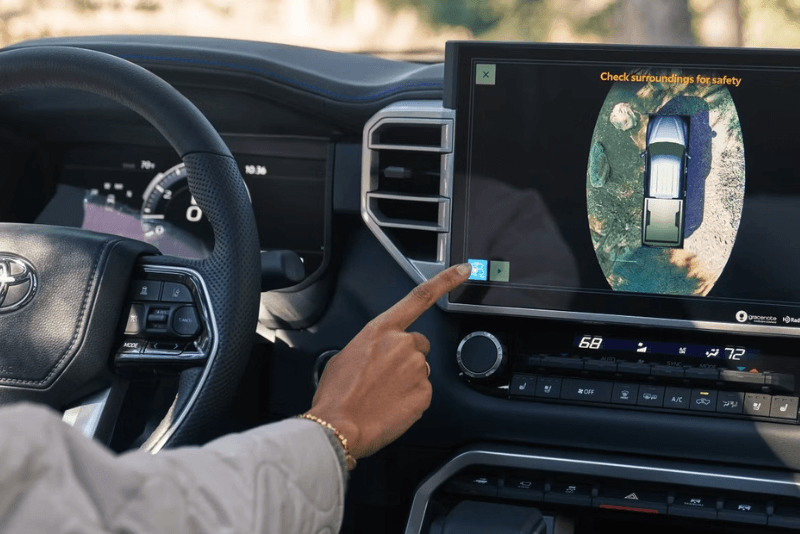
The Panoramic View Monitor ( PVM) on the Toyota Tundra displays a high-resolution 360-degree overhead bird's-eye view of the truck's immediate surroundings on the touchscreen display. By stitching together live video feeds from digital cameras mounted in the front grille, tailgate, and both side mirrors, the system shows front, rear, side clearance, and truck bed views to assist drivers during low-speed maneuvering, parking, and trailer alignment.
When you are maneuvering a full-size pickup through tight spaces, blind spots directly in front of the tall hood or along the lower door panels can make parking tricky. The Panoramic View Monitor solves this by giving drivers complete perimeter visibility on the center display. Depending on the selected viewing mode, you can view a full top-down composite layout, split-screen front or rear wide-angle feeds, or zoomed-in side angles that display tire clearance relative to curbs and obstacles.
For truck owners who haul gear or tow equipment around Columbia, being able to monitor cargo directly from the driver seat provides tremendous peace of mind. The system includes a dedicated truck bed camera view, allowing you to check tie-down straps or cargo stability without stepping out of the cabin. Toyota has announced an updated 2027 Toyota Tundra lineup, and full specifications and official details are expected in late 2026. Buyers can anticipate that the Panoramic View Monitor will continue to play an essential role across higher trim levels.
If you are planning your next truck purchase or want to see how these visibility aids function in person, our team at Roberts Toyota is ready to assist. You can reach out to us with (931) 388-3006 or drop by our Columbia showroom to explore current models and upcoming updates.
How Do Parking Views and Manual Button Controls Work in the Tundra?
During parking and tight maneuvers, the Tundra's Panoramic View Monitor activates automatically, but drivers can also press a button to engage it anytime. Located to the left of the steering wheel, pressing this view button brings up real-time camera angles on the central touchscreen when the vehicle is stopped or moving at speeds below roughly 7 mph.
When shifting into reverse, the system automatically defaults to a split-screen layout showing both the standard rear backup camera feed with dynamic grid lines and the top-down 360-degree bird's-eye perspective. When shifting into drive at low speeds, the forward-facing camera feed displays on the screen, showing obstacles ahead that might be hidden by the truck's front bumper.
While parked, activating the system displays an animated 3D rotation around a virtual render of the Tundra. This moving 360-degree perspective allows drivers to inspect the entire exterior area before shifting into gear, ensuring no toys, curbs, or low obstacles sit in the truck's path.
- View Button: Press the dashboard button near the driver's left knee to manually display surrounding camera angles when parking or pulling up to obstacles.
- Automatic Low-Speed Trigger: The camera feed automatically activates on the touchscreen when shifting into reverse or when approaching front obstacles at low speeds.
- 3D Rotating View: Select the 3D viewing mode while in park to see an animated exterior loop around the vehicle.
- 14-Inch Touchscreen Integration: Camera feeds render in crisp detail on the available 14-inch multimedia touchscreen, offering clear visibility even in bright sunlight.
When drivers stop by our dealership to look over our selection of new Toyota models, testing the camera interface on the dashboard display is often one of the first features they want to experience firsthand.
How Does the Panoramic View Monitor Improve Trailer Hookups and Backup Guidance?
Toyota's Trailer Back Up Guidance system pairs with specialized camera angles to make hitching trailers with the Tundra easier than ever. A specialized hitch zoom view focuses directly on the rear receiver ball, allowing a single driver to back up and line up a trailer tongue on the first attempt without needing a spotter.
Once hitched, the system's side mirror cameras expand driver awareness while backing up or changing lanes. During reversing maneuvers, Trailer Back Up Guidance uses rear camera sensors and algorithms to project visual trajectory guidelines on the screen. When paired with Straight Path Assist, the truck can manage automated steering adjustments to keep a trailer tracking in a perfectly straight line while the driver controls speed and braking.
For drivers navigating narrow access roads or pulling heavy loads near Spring Hill, having continuous visual monitoring of both the trailer sides and the truck bed makes maneuvering far less demanding. The system eliminates guesswork when backing a camper into a campsite or maneuvering a utility trailer into a tight driveway.
- Hitch Zoom View: Provides an overhead close-up shot centered on the tow hitch to make solo hitch alignment simple.
- Trailer Back Up Guidance: Projects dynamic path lines on the display screen to indicate trailer direction while in reverse.
- Straight Path Assist: Uses camera feedback to automatically adjust steering inputs, maintaining a straight reversing line without jackknifing.
- Side Clearance Views: Mirrors feature downward-facing cameras that display rear wheel positioning relative to trailer tires and road edges.
Shoppers researching pre-owned full-size trucks can also explore our pre-owned vehicle inventory to find equipped Tundra models with factory towing technology packages.
How Does the Multi-Terrain Monitor Differ From the Panoramic View Monitor?
While the Panoramic View Monitor is designed primarily as a 360-degree visibility aid for parking and trailering on paved roads, the Multi-Terrain Monitor ( MTM) is engineered specifically for off-road maneuvering on uneven ground. The Multi-Terrain Monitor builds upon the standard PVM hardware by adding specialized trail views, including front-wheel positioning lines and an underfloor terrain view that shows what is directly beneath the truck.
The underbody view functions by capturing camera frames as the truck moves forward and stitching them into a delayed video overlay on the touchscreen. This allows drivers to "see through" the cabin floor and front hood to check rock placements, rut depth, and obstacle clearance in real time.
| Feature | Panoramic View Monitor (PVM) | Multi-Terrain Monitor (MTM) |
|---|---|---|
| Primary Environment | Parking lots, driveways, highway towing | Off-road trails, rocky terrain, mud tracks |
| Standard Camera Angles | 360-degree bird's-eye, front, rear, side clearance | 360-degree bird's-eye, front, rear, side clearance |
| Off-Road Specific Angles | Not included | Underfloor terrain view, front tire angle guidance |
| Target Driver Need | Parking ease, curb protection, trailer hookup | Obstacle clearance, skid plate protection, line choice |
Both systems utilize the camera network around the truck, but the Multi-Terrain Monitor adjusts its software overlays based on active drive modes such as Crawl Control or Multi-Terrain Select. If you are comparing pre-owned capability packages, you can check our certified pre-owned inventory to find factory-inspected models equipped with off-road technology.
Which Tundra Trims Include the Panoramic View Monitor Standard or in Packages?
Higher-tier Tundra trims include the Panoramic View Monitor as standard equipment, while mid-range trims can add it via packages. On trims where it is standard, the system integrates into the 14-inch multimedia touchscreen alongside premium audio setups and digital rearview mirrors.
For the outgoing and current model years, the trim and package breakdown includes:
- Standard Trims: Platinum, 1794 Edition, TRD Pro, and Capstone.
- Available Option Packages: Limited and SR5 (when equipped with selected visibility and towing packages).
- 2027 Outlook: Toyota has announced an updated 2027 Toyota Tundra lineup including SR, SR5, Limited, Platinum, 1794 Edition, TRD Pro, Capstone, and a new Trailhunter package, with full trim specs and pricing expected in fall 2026.
Choosing a truck with the PVM system adds valuable long-term convenience, whether you select a fully loaded upper grade or spec a Limited trim with the standalone camera package. If you currently own a vehicle and want to upgrade to a camera-equipped Tundra, our finance specialists make it easy to value your trade online toward your purchase.
Commonly Asked Questions About the Toyota Tundra Panoramic View Monitor
Q: Does the Panoramic View Monitor show a bird's-eye view of the truck?
Yes, the system stitches together feeds from four exterior digital cameras located on the front grille, tailgate, and side mirrors to generate a top-down, 360-degree bird's-eye view on the central touchscreen display. This perspective shows the full perimeter surrounding your truck in real time.
Q: Can you manually turn on the Panoramic View Monitor while driving?
You can manually activate the system at low speeds or when stopped by pressing the View button located on the dashboard to the left of the steering wheel. For safety reasons, full perimeter camera angles switch off once the vehicle exceeds low parking speeds.
Q: Is the Panoramic View Monitor included in a standalone package?
On trims like the Limited, the monitor is available through option packages such as the Limited PVM Package, which pairs the camera hardware with power-folding outer mirrors and blind-spot monitoring. On upper trims like the Platinum or Capstone, the system comes standard from the factory.
Q: How does the camera system help when backing up a trailer?
The monitor provides a specialized hitch zoom view to line up your receiver ball precisely under the trailer coupler. Additionally, it integrates with Trailer Back Up Guidance and Straight Path Assist, which project dynamic trajectory lines and can automatically control steering inputs to keep the trailer backing straight.
Q: Does the camera system display images in dark or low-light conditions?
The system uses the Tundra's exterior LED lighting, including high-output headlights, taillights, and available side mirror puddle lamps, to illuminate the area surrounding the vehicle. While camera clarity is highest during daylight, ambient lighting provides functional visibility for night maneuvers.
If you are evaluating buying options and want to prequalify for your upcoming truck purchase, you can comfortably submit a financing application through our finance center.